
ExpertGPS Pro Wireless Survey
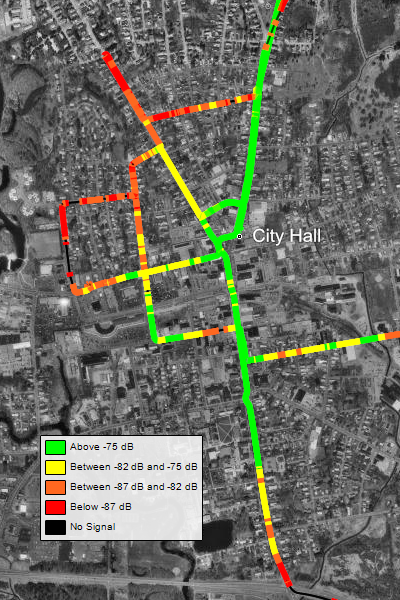
ExpertGPS Pro Wireless Survey is the first all-in-one mapping and wireless survey tool that is manufacturer and hardware independent. ExpertGPS Pro Wireless Survey is compatible with a wide range of networking hardware - all you need to begin mapping your wireless network is a laptop, a GPS receiver, and a wireless subscriber unit. Unlike other applications there are no special drivers or hardware required. You do not need to purchase an expensive survey system from the manufacturer.
How it Works
ExpertGPS Pro Wireless Survey utilizes SNMP (simple network monitoring protocol, a diagnostic protocol built into your network equipment) to query your wireless hardware and return the signal-to-noise ratio (SNR) and associated base station. As you drive, ExpertGPS queries your subscriber unit (at a time or distance interval you select) and retrieves the SNR as well as the name of the base station to which you are currently connected. This data is timestamped and recorded along with the GPS location. All of this is done automatically - all you need to do is drive. When your survey is complete, ExpertGPS Pro displays the SNR values on the map as a heat map, in four colors, representing the signal strength at each location you surveyed.
You can use the mapping tools in ExpertGPS Pro Wireless Survey to identify dead zones in your wireless network coverage, or verify that signal strength is acceptable across your entire coverage area. The exact SNR value recorded at any location by ExpertGPS can be viewed in a data table, or you can simply hover the mouse over the map and ExpertGPS will display the data it collected at that location.
ExpertGPS Pro Wireless Survey comes with seamless USGS topo maps and aerial photos of the entire United States, and color imagery is available for many urban locations. You can also import your own imagery, as well as GIS shapefiles and CAD drawings in DXF format.
To complete your visualization or to prepare a data visualization for clients, simply press F7, the View in Google Earth command, and ExpertGPS Pro Wireless Survey will convert your network heat map into a KML file and display it in Google Earth.
Request a free trial of ExpertGPS Pro Wireless Survey.
© 1998-2026 TopoGrafix – 24 Kirkland Dr, Stow, MA – Email: support@expertgps.com