
Edit Coordinates Dialog
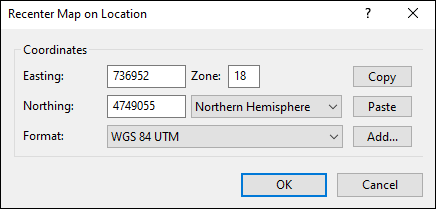
The Edit Coordinates dialog appears as part of any dialog that allows you to enter geographic coordinates, such as the Recenter Map on Location dialog above. You can switch between latitude and longitude, UTM, state plane, and national grid coordinates by selecting a coordinate format and datum from the Format drop-down list, and you can add a new format by clicking Add. The Copy and Paste buttons are a quick way to enter coordinates from another program or paste them into a report or email.
Select your coordinate format below:
Decimal Degrees (hddd.dddddº)

- Latitude
- Enter a number between 0 and 90 degrees, with up to 5 decimal places. If the latitude is negative, select South in the Hemisphere menu.
- Longitude
- Enter a number between 0 and 180 degrees, with up to 5 decimal places. If the longitude is negative, select West in the Hemisphere menu.
Tips
- Coordinates in the United States are in the Western hemisphere.
- This coordinate format is used on many Web sites that provide maps or driving directions.
Degrees and Minutes (hdddº mm.mmmmm')

- Latitude
- In the first box, enter the degrees (between 0 and 90). If the latitude is negative, select South in the Hemisphere menu.
In the second box, enter the minutes (between 0 and 59.99999). - Longitude
- In the first box, enter the degrees (between 0 and 180). If the longitude is negative, select West in the Hemisphere menu.
In the second box, enter the minutes (between 0 and 59.99999).
Tips
- Coordinates in the United States are in the Western hemisphere.
- This coordinate format is often the default format on GPS receivers, and is especially prevalent on nautical and aeronautical charts.
Degrees, Minutes, Seconds (hdddº mm' ss.sss")

- Latitude
- In the first box, enter the degrees (between 0 and 90). If the latitude is negative, select South in the Hemisphere menu.
In the second box, enter the minutes (between 0 and 59).
In the third box, enter the seconds (between 0 and 59.999). - Longitude
- In the first box, enter the degrees (between 0 and 180). If the longitude is negative, select West in the Hemisphere menu.
In the second box, enter the minutes (between 0 and 59).
In the second box, enter the seconds (between 0 and 59.999).
Tips
- Coordinates in the United States are in the Western hemisphere.
- This coordinate format is often seen on nautical charts.
Universal Transverse Mercator (UTM)

- Easting
- Enter the UTM easting.
- Northing
- Enter the UTM northing.
- Zone
- Enter the 1 or 2 digit zone number. Do not enter a zone letter. If the coordinates are in the Southern hemisphere, select South in the Hemisphere menu.
US National Grid (USNG)
US National Grid is based on the Military Grid Reference System. Follow the directions below to enter coordinates in USNG and MGRS.
Military Grid Reference System (MGRS)

- MGRS
- Enter the grid zone designator, (19T, e.g.).
Enter the 100,000-meter square identification (BH, e.g.).
Enter the local grid easting, up to 5 digits (92617, e.g.)
Enter the local grid northing, using the same number of digits as the easting (01494, e.g.)
Tips
- Enter all four parts of the MGRS coordinate string without spaces.
- You can enter fewer than 5 easting and northing digits. ExpertGPS will always display easting and northing to 5 places (1 meter accuracy)
State Plane Coordinate System (SPCS)

- Easting
- Enter the easting.
- Northing
- Enter the northing.
Tip
- State Plane coordinates are available in ExpertGPS Pro.
British National Grid (BNG)

- Easting
- Enter the 5 digit easting.
- Northing
- Enter the 5 digit northing.
- Zone
- Enter the 2 letter zone.
Related Topics



© 1998-2024 TopoGrafix – 24 Kirkland Dr, Stow, MA – Email: support@expertgps.com