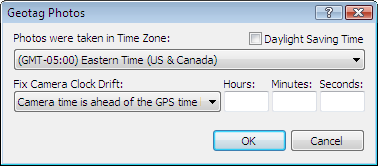
Geotag Photos Dialog

Geotag Photos dialog

The Geotag Photos dialog allows you to place your digital photos on the map, by matching the photo timestamps with the timestamps recorded in your GPS tracklog.

Time Zone
Select the time zone where the photos were taken. Set the Daylight Saving Time checkbox based on whether or not DST was in effect when the photos were taken.
Fix Camera Clock Drift
If you synchonize your camera's clock to the time displayed on your GPS each time you photograph, you'll never need to use this setting. If you forget to do it, however, there's still hope. Look at the time on both your camera and your GPS, and figure out which one is ahead of the other, and by how much. Enter those values here, and ExpertGPS will take this correction into account when geotagging your photos.


ExpertGPS is GPS mapping software designed to work seamlessly with your Garmin, Magellan, Eagle, or Lowrance GPS receiver. ExpertGPS makes it easy to view waypoints and GPS tracklogs over USGS topo maps, aerial photos, and color orthophotos. ExpertGPS Pro can send GPS data to and from ArcView GIS and AutoCAD DXF and dozens of other standard file formats.


Return to Getting Started with ExpertGPS Map Software

Visit the ExpertGPS Homepage

Find your GPS on the Mapping Software for GPS compatibility page

Download a free trial of ExpertGPS map software (30 day demo, fully-featured)


Purchase ExpertGPS map software with a credit card, PayPal, or purchase order

$59.95


Download a free trial of ExpertGPS map software (30 day demo, fully-featured)

GPS Map Software
for Windows Vista/XP


New features added
November 18, 2009


GPS Support

ExpertGPS works with:

  • ExpertGPS is Garmin GPS Map Software
  • ExpertGPS is Magellan GPS Map Software
  • ExpertGPS is Lowrance GPS Map Software
  • ExpertGPS is Eagle GPS Map Software

Find your GPS model:


Copyright 1998-2009 TopoGrafix – 24 Kirkland Dr, Stow, MA – Email: Fax Orders: (815) 346-5239