
Convert GPX to KML for Google Earth
Converting GPX to KML is easy in ExpertGPS. Open any GPX file in ExpertGPS. ExpertGPS uses GPX, the GPS Exchange Format, as its native file format, unlike other GPX converters that throw away most of your GPX data on import. View your GPX file over the maps in ExpertGPS, and if you like, change waypoint symbols or add color to your tracklogs so you'll get a better-looking result in Google Earth. Press F7, the View in Google Earth command. ExpertGPS will convert your GPX file to KML and automatically zoom to the KML data in Google Earth's map viewer.
ExpertGPS is the best KML converter for your GPX files
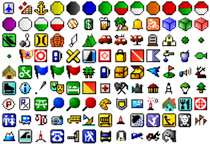
ExpertGPS does a much better job converting GPX to KML than other GPX to KML converters, because ExpertGPS creates custom KML files with the same GPS symbols used in your GPX file, so the KML placemarks in Google Earth have the exact same icons as the waypoints did on your GPS receiver. For example, here are the KML placemarks displayed for a GPX file from a Garmin Colorado 400t:
How to Convert GPX to KML: Step-by-Step Instructions
 Open any GPX file in ExpertGPS by clicking Open on the File menu.
ExpertGPS opens your GPX data and displays it on the map. Click once on the map so that it is the active window in ExpertGPS.
 Click Export Data on Map on the File menu/
At the bottom of the Export dialog, change the File Type to Google Earth KML File (*.kml;*.kmz). Your GPX data will be converted to KML. You can open your KML file and view it over the 3D color imagery in Google Earth.
GPS Support



© 1998-2025 TopoGrafix – 24 Kirkland Dr, Stow, MA – Email: support@expertgps.com