
Send to GPS Command
The Send to GPS command sends the all of the waypoints, routes, and/or tracks in the file to your GPS receiver.
Tip
- To send all of the items in the file to your GPS, use the Send to GPS command.
- To send only a particular set of items to your GPS, select them and use the Send Selected to GPS command.
To send data to your GPS, do one of the following:
- On the , click .
- On the main toolbar, click the
 Send to GPS button.
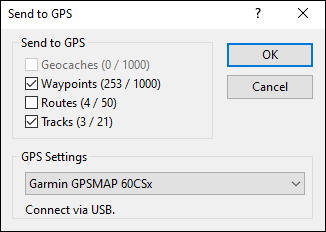
The Send to GPS dialog will appear. Check the box next to the kinds of GPS data you want to send to your GPS, and click OK.
Tip
- To send only a particular set of items to your GPS, select them and use the Send Selected to GPS command.
- To send all of the items in the file to your GPS, use the Send to GPS command.
To send a group of items to your GPS:
- Select one or more items that you want send to your GPS.
-
Then, do one of the following:
- On the , click .
- Right-click on the selected items. On the popup menu, click .
- Send to GPS
- Check the box next to each type of data to transfer from your GPS to ExpertGPS. Two numbers are listed in parenthesis. The first number is the number of items in ExpertGPS. The second number is the maximum number of items your GPS can hold.
- GPS Settings
- Select the GPS receiver that is currently connected to your GPS. The connection settings for the selected GPS receiver are displayed below. If the connection settings are not correct, close the Send to GPS dialog and open the My GPS Receivers dialog to correct them.
After the GPS transfer is complete, your GPS sent to your GPS. You may need to switch to a different page on your GPS receiver's screen to refresh its data display. Some GPS receivers only show the 10 waypoints nearest to your location by default. Consult your GPS manual for instructions on showing all the GPS data on your GPS receiver's screen.
If an Error Occurs:
- If an error message appears before the Progress dialog appears, read GPS Errors.
- If an error message appears during the GPS transfer, read GPS Transfer Errors.
- Turn the GPS off and back on again to reset the GPS interface before attempting any further GPS actions.



© 1998-2024 TopoGrafix – 24 Kirkland Dr, Stow, MA – Email: support@expertgps.com