
Measure Command
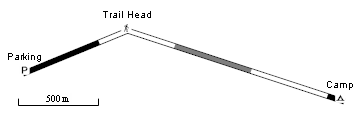
The Measure command draws the route, track, or shape in an alternating pattern with a length that matches the scale bar. Use the Measure command to quickly estimate distances along a path. In the example above, Camp is just over 2000 meters from Parking.
A check mark on the menu indicates that the item is being measured:
 Measure - the item is drawn with the measuring pattern.
 Measure - the item is drawn normally.
To measure a route, track, or shape, do the following:
- View a map.
- Select one or more routes, tracks, or shapes.
- Then, do one of the following:
- On the , click Measure.
- Right-click on the selected items, and click Measure.
- On the , click
The selected items will be drawn with an alternating pattern with a length that matches the scale bar. By counting the number of segments in the pattern, you can quickly estimate distances along the path.
When you are finished measuring, do the following:
- View a map.
- Select the measured route, track, or shape.
- Then, do one of the following:
- On the , click Measure.
- Right-click on the selected item, and click Measure.
- On the , click
The selected items will be drawn normally.



© 1998-2024 TopoGrafix – 24 Kirkland Dr, Stow, MA – Email: support@expertgps.com