
ExpertGPS Pro lets you convert CAD to KML, SHP, or CSV.
Send DXF to and from your GPS.
ExpertGPS Pro allows you to import AutoCAD drawings in DXF format and view them with seamless mapping and one-click data transfers to any Garmin, Magellan, or Lowrance GPS receiver. View your engineering drawings over topo maps and aerial photos, and combine them with field data collected with any handheld Garmin, Magellan, or Lowrance GPS receiver. Export your DXF drawings to Google Earth, and see them on top of the latest color imagery. Send boundaries and other CAD features to your handheld GPS for use in the field.
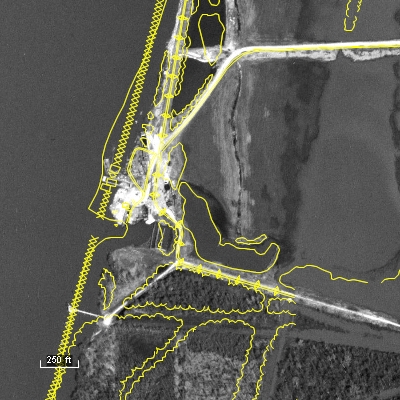
ExpertGPS Pro is a perfect tool for merging GPS-collected data with your engineering files. Preview your next job site on the maps in ExpertGPS, and map out a route to follow. Mark new features in the field as waypoints (or take photos with your digital camera) and when you return to the office, ExpertGPS will place them on the map automatically. Make any changes or add additional notes, and then export the data back to your engineering department in DXF format.
ExpertGPS allows you to paste formatted data from Excel or other tabular/CSV formats directly into the Waypoint List, making it easy to move AutoCAD or other data between your workstation and your GPS.
With an easy learning curve and a price your organization can afford, ExpertGPS Pro lets everyone in the office collect, view, and work with geospatial data. ExpertGPS Pro can manage your entire office's collection of Garmin, Magellan, Lowrance, and Eagle GPS receivers, giving you the mapping, GPS transfer, and spatial data entry tools you need to get your next job done in record time.
New features were added to ExpertGPS on April 15, 2024
ExpertGPS runs on Windows 11 and Windows 10.
 ExpertGPS is probably the best investment I've ever made in software. Every time I think I know it all, I find some other really useful feature that I never knew existed.
 Alex Mottram
Partial Client List:
- US Geological Survey
- US Fish & Wildlife Service
- Bureau of Land Management
- Army Corps of Engineers
- US Forest Service
- The Nature Conservancy
- Plum Creek Timber Co.
- Idaho Power Co.
- Chesapeake Energy
- Marshall University
- Williams College
- University of Wyoming
- Union Pacific Railroad
- Ford Motor Company
- Environmental Management Services, Inc
- Conterra Wireless Broadband
- Level 3 Communications
- Taiga Consultants
- The Cadmus Group, Inc.
- Westport Resources Namibia
- D.L. Hamlin Consulting Engineers
- Las Vegas Valley Water District
- Midway Gold Corporation
- San Ramon Valley Fire District
- Northern Hardwoods
- Pennington Seed
- Mill Valley Snowmobile Club
- American River College
- LPG Environmental
- Peters Forest Resources
- and many more...
© 1998-2024 TopoGrafix – 24 Kirkland Dr, Stow, MA – Email: support@expertgps.com